Saturday, February 03, 2007

Sups all!

Hello all, this blog was recently reviewed at blograter.com or something like that, and it just inspired me to keep on posting. First up, what I've been up to during these days:
  • I became an official contributor to the Compiz project. If you don't know what the Compiz project is then you can go to the homepage: http://www.go-compiz.org
  • I got a new wide screen monitor, and Ubuntu detected it and set it up with the proper resolution when I hooked it up. Its a Samsung SyncMaster 940BW by the way. Looks sharp and it saved me a lot of desk space.
  • I learned some Ruby programming with a book I found online. Its called Mr. Neighborly's Humble Little Ruby Book. I wanted to buy it, because its very good, but unfortunately the store that sells it doesn't ship to P.O. Boxes, so I'm out of luck. I highly recommend it if you want to learn Ruby. Check it out here: http://www.humblelittlerubybook.com
  • I don't know if I told you all, but I tried to install Arch Linux, but I couldn't get Xorg to work correctly, so I said "what the hell" and went back to Edgy. It's all been great ever since!
  • I have been gaming a lot more now, which is probably why I haven't posted that much lately, that plus classes started four weeks ago. Yikes!
Well, that's pretty much it, I need to do some homework right now, but later I'll post about two Disc Burning applications I both like. Cheers!

Monday, December 04, 2006

Update and new packages

Hello all, its been a long time since my last post. It was mostly due to school, the final weeks were rough, but all in all I'm satisfied with the result. I passed all the courses, and got some good grades to brag about, haha. Anyway, I've got two new packages and a script for ya to use.

I've got two packages for two GTK2 engines, those being Murrine and Candido. Get them here and here, respectively. And well, I got tired of typing sudo apt-get update && sudo apt-get upgrade && sudo apt-get autoremove, so I just made myself a small bash script called update.

The script is as follows:

#!/bin/bash

# Date: December 04, 2006

sudo apt-get update && sudo apt-get upgrade && sudo apt-get autoremove


You might also want to do this:

sudo ln -s /path-to-script/update.sh /usr/bin/update

That way you just have to type 'update' into a terminal and your whole system will be automatically upgraded and old, unneeded packages removed.

Friday, October 20, 2006

Go faster than Firefox!!!

Just a few minutes ago I was happily browsing the Ubuntu Forums and I stumbled upon a post about getting Ubuntu to run as fast as Arch Linux. In that post, the author mentioned this new (to me) web browser called Swiftfox, and I decided to find out if it was worth a download.

When I visited the Swiftfox website, I figured this was just an optimized build of Mozilla Firefox, but still I decided to give it a go. They have this small installer, that basicaly is just a small bash script, but its oh so very easy to use! You chose a build that suits your specific processor, and it will fetch it for you from the Swiftfox site, install it and add it to the Applications menu in Ubuntu. That's better than building Firefox from source!

Now it was the time to see if the optimization was real. After clicking the icon, almost a second after I had a nice Firefox windows with ALL the extensions loaded and working. It started way faster than the Firefox build that comes bundled with Ubuntu, way way faster.

All in all, I've found something that's even better and faster than the official build of Firefox. Give it a try!

Get Swiftfox!

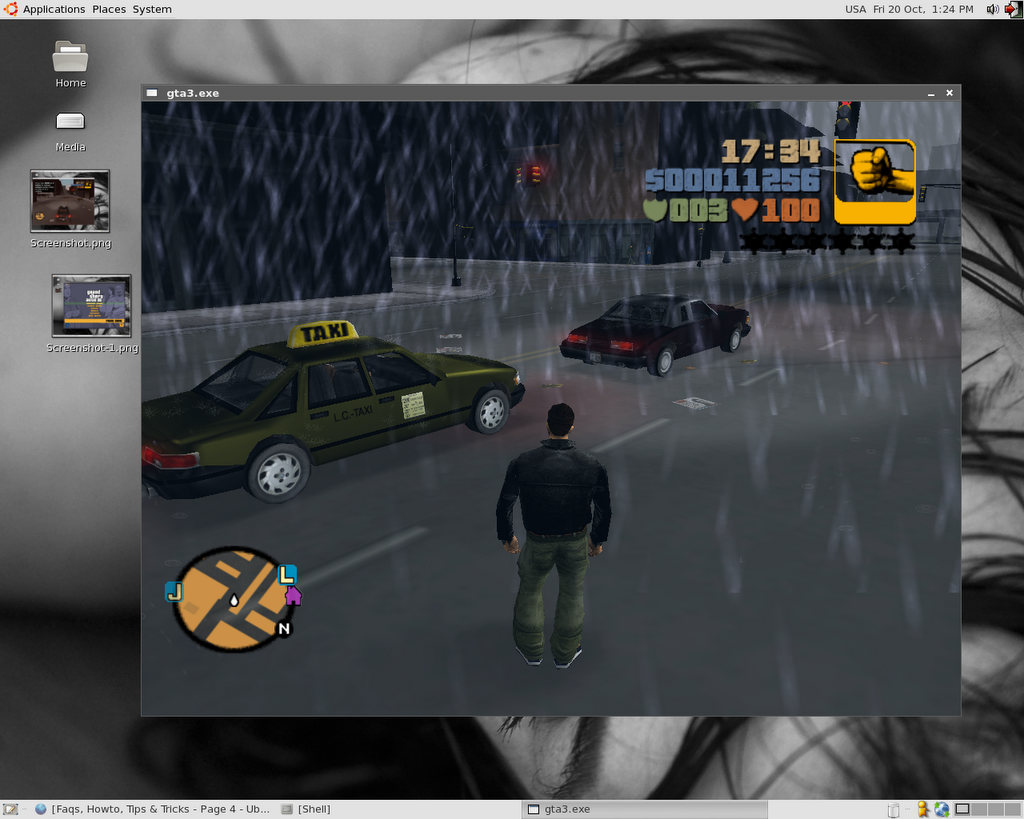
How to run GTA 3 with Wine

This how-to will walk you through installing Grand Theft Auto 3 on Ubuntu Dapper with Wine version 0.9.9.

This how-to is the result of many hours spent dealing with wine-cvs, the latest stable wine, and the 'standard' wine that Dapper provides in the repositories. I HAD to use the version dapper provides because the newer version wouldn't let me install the game (it crashed), and the cvs version simply did not work.

This is a long process. First, get a Windows machine and install GTA 3 on it. Next go and download the patch to upgrade the game to version 1.1.

Click here to download the patch!


Now, insert the second CD into your drive and open it with windows explorer. Navigate to the 'audio' folder and copy everything that is inside it to C:/Program Files/Rockstar Games/GTAIII/audio/

As you know, wine doesn't have any form of copy protection support built in, so in order to play we need a game 'fix' or 'crack' to disable this copy protection. If this how-to were for Windows machines, then I'd be in trouble, but this is so we can play on Linux. You need to find a decent no-cd crack, but I did the job for you.

Click here to download the no-cd crack!

Unzip the crack. Inside you'll find an unrar_me.rar file. Unrar it (I assume you know how to use WinRar). Now you've got two files: gta3.exe and a text file; ignore the text file. Go to C:/Program Files/Rockstar Games/GTAIII/ and rename gta3.exe (the one in that directory) to gta3.bak. Now copy the cracked gta3.exe to the game directory. Double click it to play, this will create some files and compress the textures for that particular computer. Complete the first mission.

That was the easy part, but now we need the game on Linux. Go to your Linux computer and install wine.

sudo apt-get install wine

This should install wine 0.9.9, the version you need to run the game. Once wine is installed open up a terminal and type winecfg to run wine's configuration utility.

On the Applications tab leave everything as it is, move on to the Graphics tab. In it check the boxes for "Enable desktop double buffering", "Allow the window manager to control the windows", "Emulate a virtual desktop" (set it to 800x600), and "Allow Pixel Shader". On the Direct3D section, set the Vertrex Shader Support to "hardware".

Now move on to the Audio tab. Uncheck any boxes that are checked, then check the box for "ALSA Driver". On the DirectSound section set the Hardware Acceleration to "Emulation" and check the box for "Driver Emulation". After doing this you're finished with wine's setup.

Get your GTA 3 disks out and insert the first CD into your drive (in your Linux computer). Ubuntu will auto-mount it for you in /media/cdrom0, so open up a terminal and change to that directory. Once there type wine Setup.exe to install the game, it should install just fine.

Phew, alright, the game is installed, but you must patch it to version 1.1. Get the patch and save it in /home/your-user-name/.wine/drive_c/Program Files/Rockstar Games/GTAIII. Now change into that directory and run the patch with wine gta3patch.exe.

Ok, now get the crack and do the same you did on the windows machine to apply it. Then try and play with wine gta3.exe (while on the game's install directory). You may notice that when the game is compressing the textures, the game will crash, and you won't be able to play it at all.

This is where our Windows instalation comes in. Go to your Windows machine and be ready to burn some cd's or a dvd. You need to transfer ALL of the files installed on the Windows machine to your Linux machine. The files I'm talking about are all the ones in C:/Program Files/Rockstar Games/GTAIII/, so its better to just copy the whole GTAIII directory.

Once you've got the files on some cd's, dvd, or external hard drive go to your Linux machine and rename the GTAIII folder in home/your-user-name/.wine/drive_c/Program Files/Rockstar Games/GTAIII to GTA3.

Then do:

mkdir /home/your-user-name/.wine/drive_c/Program Files/Rockstar Games/GTAIII

After that you must copy everything in you cd's, dvd, or external hard drive to that directory.

Now go to /home/your-user-name/.wine/drive_c/Program Files/Rockstar Games/GTAIII (the directory where you pasted all files from the windows instalation in) and play with wine gta3.exe.

The game should launch and all should be good. Congratulations!!!

Now that the game is running you can do

rm -rvf /home/your-user-name/.wine/drive_c/Program Files/Rockstar Games/GTA3

to get rid of those extra files.

Known problems:
  • The mouse on the menus doesn't work, you must use the keyboard arrows.
  • Sound 'lags' a bit, but it doesn't bother at all, its just a second behind of what happens on screen.
Good luck!!

Thursday, October 19, 2006

aria2 Packages

Hello good people. Today I built two new packages, one is for ares, a package requiered by the nice p2p/bittorrent/metalink client aria2. Of course, the second package is aria2 itself, which was built on my ubuntu 6.06.1 system.

The aria2 package was built without libgcrypt because I couldn't get it to compile because it didn't find libgpg-error, although it was already installed. This does not mean this package lacks checksum support, as it was built with OpenSSL.

I hope you enjoy the packages!

Download the ares package!
Download the aria2 package!

Wednesday, October 11, 2006

New Transmission Package!

Well, I am no longer using this particular bittorrent client, but I think its still worth building packages for those who are using it, so here is the latest package. This one was built with checkinstall a few minutes ago with the latest svn source (r991 at the moment). I hope you enjoy this one! :D

Download the package!

Tuesday, October 10, 2006

Busy as hell


Well, I know there has been a lack of posts these past two weeks. Its just that life caught up with me, and so homework and studying became part of my life yet again. However, only a month remains before I get some much-needed rest. Be patient, more info will come your way.

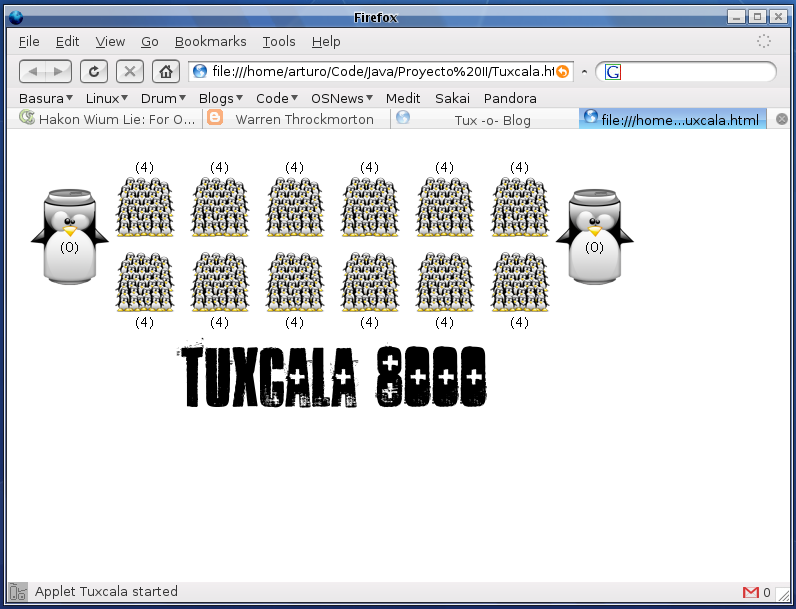
As a sidenote, here is a screenshot of a programming project some friends and I have been working on. Its a Java game based on the ancient game Mancala, but with tuxes, so its Tuxcala! I hope that it will be published here along with its source code when its ready.

Sunday, October 01, 2006

How to write a good How To

Whether you are trying to contribute to an Open Source project or you want to attract traffic to your blog, How To's can help you. This is a list of things to keep in mind when writing a How To.

read more | digg story

Monday, September 11, 2006

BSD Vs. Linux - What you did not Know

While there's overwhelming similarity between the operating systems in most cases, there are also a lot of differences. As you probe more into the differences, you find that they emerge from deep-seated disagreements.

read more | digg story

Sunday, September 10, 2006

New Ubuntu team to focus on desktop effects a la XGL, AIGLX

Mark Shuttleworth says he's "pleased to see John Vivirito announcing a desktop-effects team for Ubuntu, that will focus on the integration of 3D technology into the desktop like Xgl, Compiz and AIGLX."

read more | digg story

An even better BitTorrent client for Linux!

Well, after all the problems with Transmission and popular trackers like OiNK and Demonoid I decided to try something else. I tried out Tribler, but it wasn't that good, so after snooping around the Ubuntu forums I found about this relatively new client called qBittorrent. At first I refused to use it, as I don't like running Qt apps under Gnome, but after searching some more, and not finding anything better I decided to go for it.

The client is way better than anything I've used before. It even has an inbuilt torrent search plugin, like the famous uTorrent on windows. It also has all the major features you may need/want from a mature client.

The good news is that it is actively developed, it has a very nice and fresh look, and there's official Ubuntu and Debian packages on the download page and last time I checked it was in the repositories. That's a lot to say, because we now have official support from the qBittorrent team when packages don't work, etc.

All in all, its the best client I've used so far. Try it out!

Wednesday, September 06, 2006

New Transmission package for Ubuntu

It's been quite a while since I wanted to upgrade Transmission and test the svn version, but Applecrow's download page gives a 404 error, so no svn debian package! So I thought I'd build one myself, and here it is, I give it to the world!

This package was built with the latest source tarball from Transmission's homepage using checkinstall. I need people to test it to see if it works properly.

The package installs Transmission to /opt/transmission

You might want to do this:

sudo ln -s /opt/transmission/bin/transmission-gtk /usr/bin/transmission-gtk

This will enable you to run Transmission by just typing 'transmission-gtk' into the terminal (without the quotes).

Download the package! - NOTE: A new package is already available, check the newer posts.

P.S. I need better hosting, if anyone can provide it please leave a comment with more info. Thanks!

Free Linux Disks needs your support!

The folks at FreeLinuxDisk have 20,000 orders to fulfill with an additional 60-100 requests a day. To fulfill the orders in a timely fashion they have to buy an automated CD duplication machine ($4500 CDN). The goal is to raise $4,500 to purchase "Big Daddy Tux" in order to meet with the ongoing demand for Linux disks. Show them your support!

read more | digg story

Tuesday, September 05, 2006

Free Linux Disks Delivers First Shipment

It is with great delight that I announce the first bulk shipment of free Linux disks from the Free Linux Disk project. This would not have been made possible without support from the contributors, the sponsors, and your donations. A huge thank you to everyone that continues to help and make the project a success.

read more | digg story

Saturday, September 02, 2006

How to get the latest compiz packages on Ubuntu

It's really simple, actually. First you'll backup your sources.list file to be on the safe side, so do:

sudo cp -v /etc/apt/sources.list /etc/apt/sources.list-backup

Now we'll edit the file:

sudo gedit /etc/apt/sources.list

At the end of the file add one of these lines:

deb http://www.beerorkid.com/compiz dapper main
deb http://media.blutkind.org/xgl/ dapper main
deb http://ubuntu.compiz.net/ dapper main

Next you need to add the public key of the repository you chose, so run one of these commands:

wget http://www.beerorkid.com/compiz/quinn.key.asc -O - | sudo apt-key add -
wget http://media.blutkind.org/xgl/quinn.key.asc -O - | sudo apt-key add -
wget http://ubuntu.compiz.net/quinn.key.asc -O - | sudo apt-key add -

Now do:

sudo apt-get update
sudo apt-get dist-upgrade

Now all your compiz packages should be updated to their latest version. If you want to do it the graphical way, after doing the apt update go to System > Administration > Update Manager and it will list the available compiz updates, along with any other updates your system may require.

Also, if you installed XGL/Compiz following the Ubuntu Guide instructions, you may need to install cgwd, which is the windowd decorator recommended for compiz. So do this:

sudo apt-get install cgwd cgwd-themes gnome-compiz-manager

Gnome-compiz-manager is a graphical configuration tool for compiz, which allows to set how many virtual desktops you want, enable or disable effects, etc.

Cgwd-themes is a theme pack for cgwd.

Also, if you start compiz with /usr/bin/thefuture you need to edit it, because gnome-window-decorator is obsolete now.

Make it look like this:
#!/bin/bash
cgwd & compiz --replace gconf decoration wobbly fade minimize cube rotate zoom scale move resize place switcher &
xmodmap /usr/share/xmodmap/xmodmap.us

Remember to set the appropiate xmodmap!

UPDATE: The latest updates change the way Compiz starts and the thefuture script is no longer usefull.

To start Compiz add the following line to the 'Startup Programs' in System > Preferences > Sessions:

/usr/bin/compiz-start

And don't forget to remove the thefuture script from there too!

That's all, I hope this is usefull.

Wednesday, August 30, 2006

A victory for Linux

I always told my friends at university that Linux was good, and that it was better than Windows (for me), although I used the Microsoft operating system too. But as I stated on a previous post, I ditched Windows not long ago.

What has been quite surprising is that now five of my friends are using Ubuntu on their machines because Windows caused them too many problems, so they decided to give Linux a go. They liked it and are now using it, but take in account that they're computer science students, so they know their way around computers (in theory).

Other two friends are considering making the switch. They always ask me what Linux distribution they should install, and I always say "Ubuntu", simply because it works alright on most machines, and it's relatively easy to use and maintain.

These guys are somewhat knowledgeable about Windows, but one of then didn't even know how to partition a hard drive. Still, that didn't stop him and I helped him to install Ubuntu on his laptop. It worked alright, but the wireless network didn't work, and I told him I'd help him out later, but that he should search the Ubuntu forums and google to see if he could figure it out on his own. Today he told me he got it working and that made me feel good, because they're learning the ropes of a new system on their own.

The whole point of this post is that you can help the whole open source / free software movement by just using it. Sooner or later your friends or someone you know may become curious and discover this new world where (almost) everything is free, it works, and there is a big community of people willing to help you out with your problems. Not all is bad in the Linux world.

Sunday, August 27, 2006

The Ubuntu effect

Ever since I switched to ubuntu I've noticed my chronic torrent-downloading habbit has decreased by leaps and bounds. I think this is in part because there is a lack of decent bittorrent clients on linux. I know there is azureus, but it consumes a lot of ram and I haven't had the best of experiences with it on ubuntu.

There's hope though, and it's not uTorrent, but it's close. It's a client called Transmission. It's small, fast and sleek. It works really good, and I get the same speeds I achieved with azureus on windows xp, so no problems there. Still, there seems to be a problem with Transmission and some tracker sites, like demonoid. This bug (I think is a bug) makes your ratio go up or go down, so it's risky, but this has been reported with the svn unstable version (0.7.x I think), so if you're having problems just downgrade to 0.6.1 and you're good to go.

If you're searching for a nice bittorrent client on ubuntu just do sudo apt-get install transmission-0.6.1 and try it out!

Human stupidity

Today on the newspaper I was reading about a girl from pakistan who was murdered (beheaded) by her own father. He did it because she was living with an italian man, she smoked and had a tatoo, and refused to marry one of her cousins in pakistan, as the family had arranged.

The mother said her daughter was a "bad muslim", and that she dishonored the family. That may be ok, but not enough reason to kill your own daughter. It seems to me that the guilty ones here are the girl's parents, because if they wanted to keep their home country traditions they shouldn't have left it in the first place. How can they expect their sons not to be influenced by the european/occidental culture they're exposed to every day?

Saturday, August 26, 2006

Life with Ubuntu

A week ago or so I decided to ditch windowx xp on my machine. I would install one of the many popular Linux distributions floating around on the net and mentioned in distrowatch, a site I always visited for the fun of it. Anyway, windows saw the last of me some time ago, and I decided to install the Zenwalk linux distribution, which is based on Slackware linux, but I had some problems with it, regarding it's hardware detection (sound), and its bootloader (lilo). The thing is that Zenwalk made things harder for me, because when it installs lilo, it gets stuck on your hard drive's mbr, and won't go away, so I had to boot up with a windows 98 (gasp!) boot diskette to erase the mbr, which is my rather primitive way of doing it.

Anyway, after wiping clean my mbr I installed ubuntu, the 6.06 LTS release. I was planning on using the xfs filesystem, as its very efficient and has support for über large files, but a bug in the installer, related to grub I guess, prevented me from using that filesytem. Anyway, after settling on reiserfs all went smoothly.

After the initial setup, I went ahead and began to use the preloaded software. The distro is not bloated, it has one application for each use, and its very easy to install new software by using the synaptic package manager or the terminal (a wee bit more advanced). What impressed me was the automatic updates and that the system notified you if you had packages that could be upgraded, but this proved to be hell when the dreaded xorg update came about, but that's another story.

The main problem with ubuntu was its instability concerning the nvidia driver setup, because everything was correctly configured, yet it wouldn't load with the correct screen resolution and it became quite annoying.

To make the long story short, I ended up screwing the system, rendering it unusable, and then I tried reinstalling, but the same problem kept happening. So I decided to download the alternate install cd image, which provides a text installer rather than the live cd graphical installer. I fired it up in expert mode and it gave me the choice to configure my xserver beforehand, so I just picked the resolutions I wanted and presto, on the first boot I had my precious resolution correctly set up and working! After that all has been ubuntu love!

Welcome

Welcome to the Tux -o- Blog, where I'll post random thoughts, guides and how-to's, etc. about the linux operating system. Also I'll post more general posts about me, my life and my thoughts. This is all for now, cheers!